Alarm Clock Buying Guide: What to Consider Before You Buy
Most people buy an alarm clock the way they buy a phone charger — quickly, without much thought, and then live with the annoyances for years. A few minutes spent matching the right features to your actual sleep problem saves a lot of frustrated mornings later. This is a decision framework, not a list of specific products — use it to figure out what you actually need before you go shopping.
The short answer
Before buying an alarm clock, work through five questions: do you need battery backup (yes, if power cuts are common where you live), how do you want to snooze (or not snooze at all), do you need adjustable brightness for a dark bedroom, do you want a standalone device or a phone app, and what's actually causing your alarm problems — because if it's oversleeping or snoozing rather than simply not owning a clock, you need a feature set (task-based mission alarms, escalation) that most basic clocks don't have at all.
The checklist
1. Battery backup
If your power has ever gone out overnight, you already know the fear of a clock reset to 12:00. Look for:
- A clock with a battery backup slot (usually AA/AAA), which keeps time and sometimes the alarm active through a power cut.
- If you're using a phone app instead, this becomes about charge level — keep the phone plugged in overnight, and consider a phone alarm app as your real "battery backup" for a bedside clock's power failure.
2. Snooze design
Snooze isn't a single feature — how it's implemented matters a lot:
- Snooze length: shorter (5-9 minutes) tends to work better than long snooze windows, which just delay the problem.
- Snooze limits: some clocks and apps let you cap the number of snoozes, which is worth having if you know you're a repeat offender. See how to stop hitting snooze.
- No snooze at all: some people do better removing the option entirely, especially paired with a task-based alarm that requires real engagement to turn off.
3. Brightness and display
- Dimmable display: a screen bright enough to read at night can also be bright enough to disrupt your own sleep or a partner's. Look for adjustable brightness or an auto-dim sensor.
- Readability half-asleep: large, high-contrast numbers matter more than they seem to in a bright showroom.
4. Sound and wake mechanism
- Volume range and escalation: a single fixed volume is less effective than gradual escalation for most sleepers. See best alarm sounds to wake up.
- Sound variety: being able to change tones prevents habituation to one sound over months of daily use.
- Vibration option: useful for heavy sleepers or shared bedrooms — see vibrating alarm clock.
- Volume ceiling, if you're a heavy sleeper: check decibel specs if this is your main issue — see loudest alarm clock.
OwlRoutine helps you wind down at night and actually get up in the morning — with a guided wind-down, dismiss missions, and sleep scores. Available on iPhone and Android.


5. Standalone device vs phone app
| Consideration | Favors standalone | Favors app |
|---|---|---|
| Keeping phone out of the bedroom | Yes | No |
| Wanting task-based mission alarms | No | Yes |
| Travel | No (extra item to pack) | Yes |
| Budget | Varies widely | Usually free or low-cost |
| Wanting sleep/wake history | Rare | Common |
| Wanting a sound machine too | Common in bundled devices | Usually separate |
There's no universally right answer here — see best digital alarm clock for a fuller comparison by use case.
6. Price range and what you're actually paying for
- Under $20: basic function, battery backup, simple sound. Fine if your only need is "tells time, makes noise."
- $20-60: better displays, sound variety, sometimes sunrise-light features or Bluetooth.
- $100+: full sunrise simulation, sound machine, app connectivity — see Hatch alarm clock alternatives for what you're paying for at this tier.
- Free-$5/month app: often the best value if your core problem is behavioral (snoozing, oversleeping) rather than hardware-related, since mission-based and escalation features are usually software, not hardware.
7. What's the actual problem you're solving?
This is the step most buying guides skip, and it's the most important one:
- "I don't own an alarm clock" → almost any basic clock or your phone's default app solves this.
- "I wake up groggy" → look at sleep-cycle-aware timing or work on your wind-down routine — the clock isn't really the issue.
- "I keep hitting snooze" → you need snooze limits or a task-based alarm, not a louder sound. See what is a smart alarm clock.
- "I sleep through it entirely" → you need escalation, vibration, and ideally a mission-based alarm — volume alone often isn't enough. See best alarm app for heavy sleepers.
Buying based on the actual failure mode, rather than generic "best of" features, is the single biggest factor in whether a new alarm clock actually fixes anything.
The bottom line
The right alarm clock isn't the one with the most features — it's the one that matches your actual failure mode. Battery backup and brightness matter for everyone; snooze design, escalation, and mission-based tasks matter specifically if snoozing or sleeping through alarms is your real problem, which a basic clock, however nice-looking, won't fix.
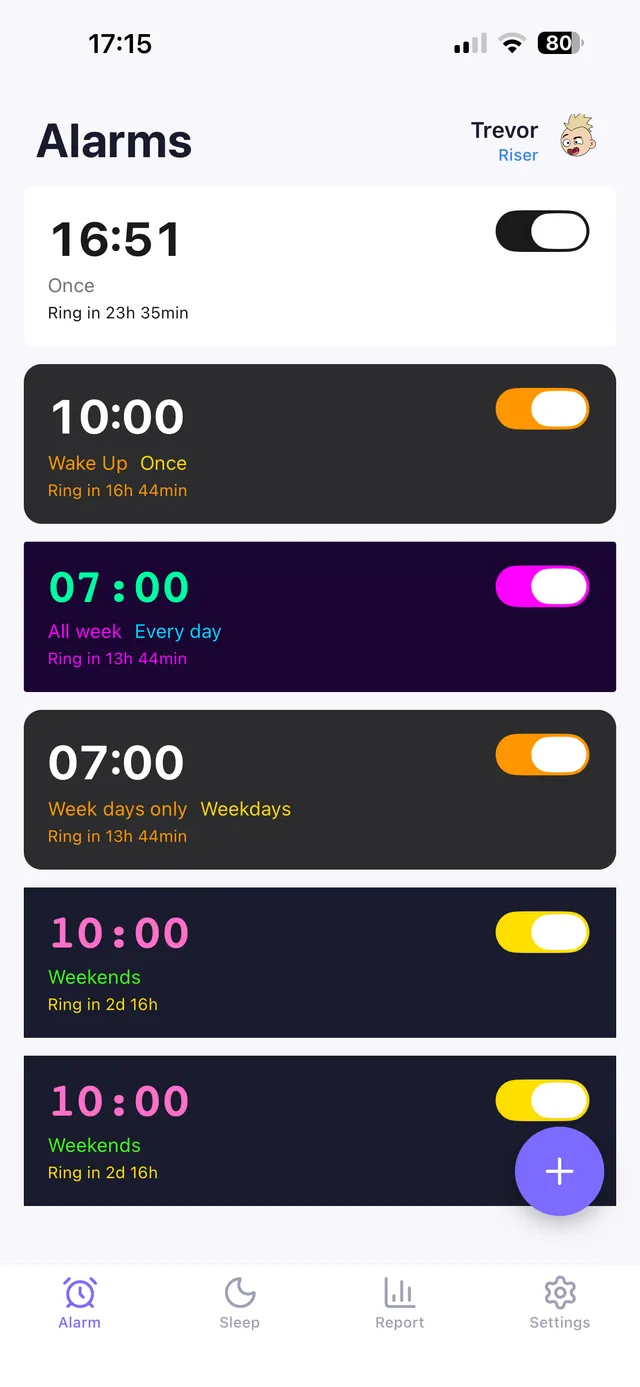
OwlRoutine is built for the behavioral end of this checklist: mission-based alarms that require completing a real task to turn off, escalating alerts, and a guided wind-down the night before, so the fix addresses why you're struggling to wake up, not just how loud the clock can go.
Frequently asked questions
What's the most important feature in an alarm clock?
It depends on your actual problem. For most people, reliable power (battery backup or a charged phone) and a wake mechanism that matches their failure mode — loud sound, vibration, or a task-based alarm — matter more than any single spec.
Should I buy a standalone alarm clock or use my phone?
A standalone clock keeps your phone out of the bedroom; a phone app usually offers more advanced features like mission-based alarms and sleep data. Neither is universally better — match it to what you're trying to fix.
How much should I spend on an alarm clock?
Basic clocks run under $20, feature-rich sunrise/sound-machine devices run $100+, and many of the most useful behavioral features (escalation, mission tasks, snooze limits) are software-based and available free or low-cost through an app.
What should I buy if I keep sleeping through my alarm?
Volume alone often isn't the fix. Look for escalating sound or vibration paired with a task-based mission alarm that requires real engagement to turn off, rather than just a louder clock.
Wake up for real. Wind down for good.
OwlRoutine is a sleep-cycle alarm that makes mornings actually stick — with a guided wind-down, dismiss missions, sleep scores and rewards. Available on iPhone and Android.