An Alarm That Makes You Get Out of Bed: 6 Types Compared (and Which Actually Work)

If your mornings go "alarm, snooze, snooze, panic", you've probably searched for an alarm that makes you get out of bed. There are plenty of options — some clever, some ridiculous — and they all share one idea: the alarm doesn't stop until you've done something you can't do lying down. Here's how the main types work, how people cheat them, and how to choose.
The short answer
The most effective alarm that makes you get out of bed is one where dismissing it requires you to physically go somewhere — typically a photo mission (take a photo of a specific place, like your bathroom sink or your made bed) — combined with snooze turned off. Math and typing missions wake your brain but can be done in bed; pair them with a phone kept across the room.
The 6 types of get-out-of-bed alarms
| Type | How it works | Gets you out of bed? | Easy to cheat? |
|---|---|---|---|
| Photo mission app | Match a photo of a set location | Yes | Hard (if location is outside the bedroom) |
| QR / barcode mission app | Scan a code placed elsewhere | Yes | Hard |
| Steps / walking mission | Walk a number of steps | Mostly | Medium (shake the phone) |
| Math / typing / word mission | Solve a task on screen | No, but wakes your brain | Medium |
| Phone across the room | Stand up to reach it | Briefly | Easy (walk back to bed) |
| Running / flying alarm clock | Device rolls or flies away | Yes | Medium (switch it off at night) |
1. Photo mission alarms
You take a reference photo of a place — say, your bathroom sink, the kettle, or your freshly made bed. In the morning, the alarm keeps ringing until you take a matching photo. Because you have to physically go there and frame the shot, you're up and moving by the time it stops.
Tip: choose a spot outside the bedroom if you're prone to going back to bed.
2. QR or barcode alarms
Similar idea: you print a QR code or pick a barcode (toothpaste, coffee jar) and scan it to stop the alarm. Effective, but if you lose the code or the product runs out, you'll need a backup.
3. Step or walking missions
The alarm stops after a set number of steps. It gets you moving, but some people learn to shake the phone instead.
4. Math, typing and word missions
These don't force you out of bed, but they solve a different — and very common — problem: dismissing the alarm on autopilot. A short math or typing task pulls your thinking brain online. Here's how math alarms work. Combine them with a phone placed across the room.
OwlRoutine helps you wind down at night and actually get up in the morning — with a guided wind-down, dismiss missions, and sleep scores. Available on iPhone and Android.


5. Phone across the room
The classic free trick. It works as long as you don't walk over, silence it and walk back — which many people do. Adding a mission fixes this.
6. Running and flying alarm clocks
Gadgets that roll off the nightstand or launch a propeller you have to catch and put back. They're fun, and they do get you up — but they're noisy for partners, and plenty of people just switch them off before sleeping.
How to choose
- You fall back asleep after getting up: photo mission outside the bedroom.
- You don't remember turning the alarm off: math or typing mission.
- You share a room: a phone app with vibration and a moderate tone, rather than a gadget that crashes around.
- You're a heavy sleeper: a mission alarm plus a consistent wake time. See how to wake up a heavy sleeper.
Whatever you choose, turn snooze off. Snoozing after completing a mission defeats the point. Why snoozing makes you more tired.
Make sure it actually rings
A get-out-of-bed alarm is useless if Silent mode mutes it. On iPhone, apps using Apple's AlarmKit (iOS 26+) ring through Silent mode and Focus like the Clock app. Test any app by setting an alarm a few minutes ahead with your phone on silent. More on AlarmKit here.
The part the alarm can't do
Even the best alarm is fighting an uphill battle if you went to bed at 1:30am. Getting out of bed is far easier when you've had enough sleep and your wake time is consistent. Fix your sleep schedule and get enough sleep, and the alarm only has to do a small job.
The bottom line
The alarms that reliably get you out of bed make you go somewhere — a photo or scan mission in another spot — with snooze switched off. Math and typing missions are great for waking your brain, especially paired with a phone across the room. And whatever you pick, the night before still matters most.
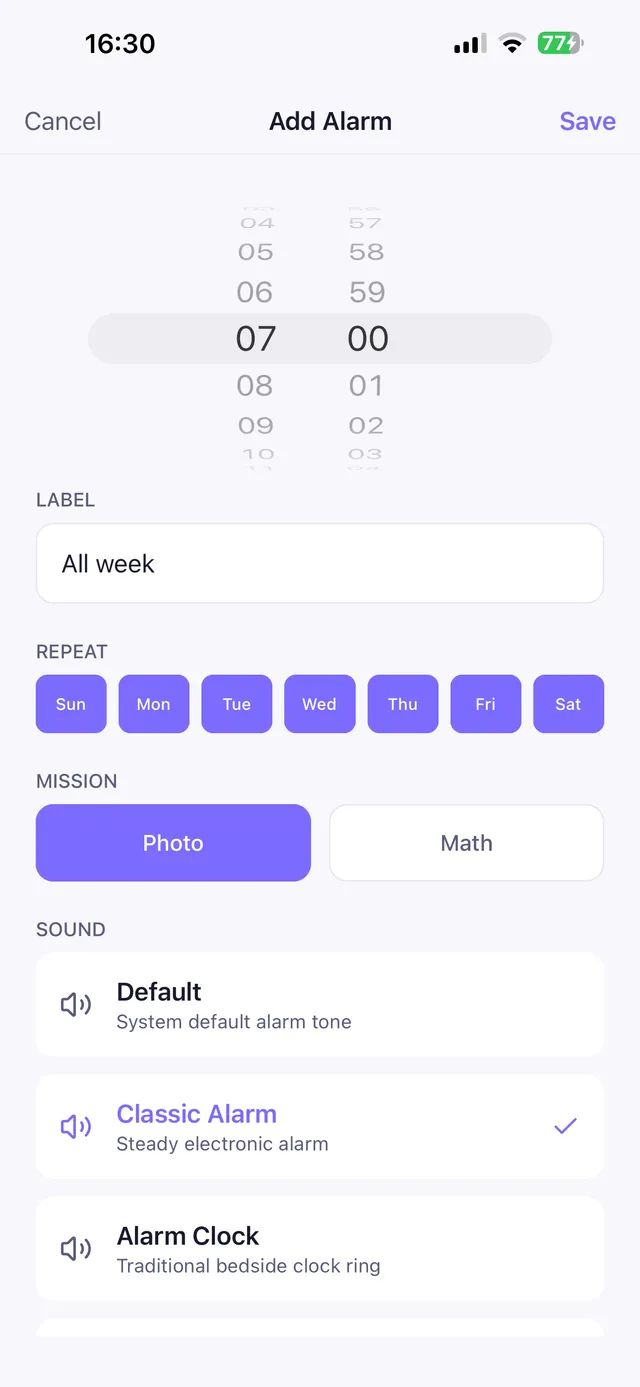
OwlRoutine's bed-photo mission is built for this: during setup you photograph your bed, and in the morning the alarm stops only when a new photo matches (after three failed attempts it falls back to a math problem). You can also choose math, word or typing missions — and the difficulty depends on whether you completed your wind-down the night before.
Frequently asked questions
What alarm makes you get out of bed?
Alarms with photo or barcode missions, which only stop when you photograph or scan something in another location, are the most effective. Walking missions and running alarm clocks also work but are easier to cheat.
Is there an alarm that makes you take a picture?
Yes. Photo mission alarm apps compare a morning photo with a reference photo of a place you chose, such as your bathroom sink or your bed, and keep ringing until they match.
How do I stop going back to bed after my alarm?
Turn snooze off, use a mission that requires you to leave the bed, get bright light immediately and have a small first task like drinking water.
Do math alarms make you get out of bed?
Not on their own — you can solve them in bed — but they wake your brain enough to prevent autopilot dismissals. Pair them with a phone across the room.
Wake up for real. Wind down for good.
OwlRoutine is a sleep-cycle alarm that makes mornings actually stick — with a guided wind-down, dismiss missions, sleep scores and rewards. Available on iPhone and Android.