Math Alarm Apps: Do Alarms That Make You Solve Problems Actually Wake You Up?

A math alarm app is exactly what it sounds like: an alarm that keeps ringing until you solve one or more arithmetic problems. It sounds like a gimmick, but for chronic snoozers and heavy sleepers it's one of the most effective tricks there is — because it targets the real reason people sleep through alarms. Here's why it works, how to set it up so it's hard enough, and what other missions to try if math isn't your thing.
The short answer
Math alarms work because they force your prefrontal cortex — the part of your brain responsible for focus and working memory — to come online before the alarm stops. You can't solve "47 + 38" while mostly asleep, so you can't dismiss the alarm on autopilot. Choose problems that take 20–60 seconds, turn snooze off, and pair it with a consistent wake time.
Why normal alarms fail
When most people "sleep through" their alarm, they didn't actually miss it. They heard it, reached out and silenced it — without becoming conscious enough to remember. That motor habit is fast, automatic and happens in a state of heavy sleep inertia, when decision-making is at its worst. Why you sleep through your alarm covers the other causes too.
A math alarm breaks that chain. The dismiss action is no longer a single tap; it's a small cognitive task.
How hard should the math be?
| Difficulty | Example | Good for |
|---|---|---|
| Easy | 12 + 9 | Light sleepers who just need a nudge |
| Medium | 47 + 38, or 3 × 14 | Most people; wakes you without frustration |
| Hard | 6 × 17 + 23, or several problems in a row | Heavy sleepers, chronic snoozers |
A good rule: if you can solve it with your eyes half-closed, it's too easy. If you find yourself dreading the alarm or getting stuck for minutes, it's too hard — and you're more likely to switch the app off entirely.
Start at medium, then adjust after a week based on how awake you feel when it stops.
Why it works (the science-ish bit)
There isn't a large body of clinical trials on "math alarm apps" specifically, but the mechanism is well grounded:
- Sleep inertia mainly affects higher thinking. Research shows that complex cognitive functions lag behind basic arousal after waking. A task that demands those functions acts as a gate — you only pass it once they're online.
- Effort breaks automatic behaviour. Habits run on autopilot; tasks that require attention interrupt them.
- Activity raises alertness. Sitting up, holding the phone and concentrating all increase arousal compared with lying still.
OwlRoutine helps you wind down at night and actually get up in the morning — with a guided wind-down, dismiss missions, and sleep scores. Available on iPhone and Android.


Other alarm missions worth trying
Math isn't the only option. Different missions suit different people:
| Mission | How it works | Best for |
|---|---|---|
| Math | Solve arithmetic problems | Most people; quick and effective |
| Typing | Type a phrase exactly | People who'd get stuck on math, or want slower wake-ups |
| Word | Unscramble or recognise words | Language lovers; variety |
| Photo | Take a photo matching a reference spot | People who fall back asleep in bed |
| Shake / steps | Shake the phone or walk | Physical wake-ups (easier to cheat in bed) |
Photo missions are especially effective if you tend to solve the mission and then lie back down, because you have to physically go somewhere to complete them. If you choose a photo of your made bed, for example, you've got to get up and step back to take it. We compare mission alarm apps in the best alarm apps for heavy sleepers.
How to set up a math alarm properly
- Pick a consistent wake time. A mission alarm that fires at a different time every day is fighting your body clock. Here's why consistency matters.
- Choose medium difficulty to start.
- Turn snooze off. Otherwise you'll solve the problem, hit snooze and go back to sleep. Why snoozing backfires.
- Make sure it rings on silent. On iPhone, apps using AlarmKit (iOS 26+) can ring through Silent mode and Focus. See iPhone alarm not going off?.
- Stand up once it stops. The mission gets you awake; the first 60 seconds after it decide whether you stay awake. Water, light, feet on the floor.
Common ways people cheat (and how to stop)
- Uninstalling or force-quitting the app. If you're doing this, the problem is usually the night before — you're too short on sleep. Fix bedtime first.
- Keeping it too easy. Raise the difficulty or number of problems.
- Solving it and going back to sleep. Combine with a photo mission of somewhere outside your bedroom, or put the phone across the room.
Is a math alarm a good idea for everyone?
Most people find them effective and not stressful. But if you have anxiety about mornings, very harsh missions can make the alarm feel threatening. Keep it at a level that's awake-making, not punishing — and remember that the aim is to wake up, not to pass a test.
The bottom line
Math alarm apps work because they force your thinking brain online before the alarm goes quiet — which is exactly what autopilot dismissals prevent. Pick medium-difficulty problems, turn snooze off, make sure the alarm rings on silent and stand up as soon as it stops.
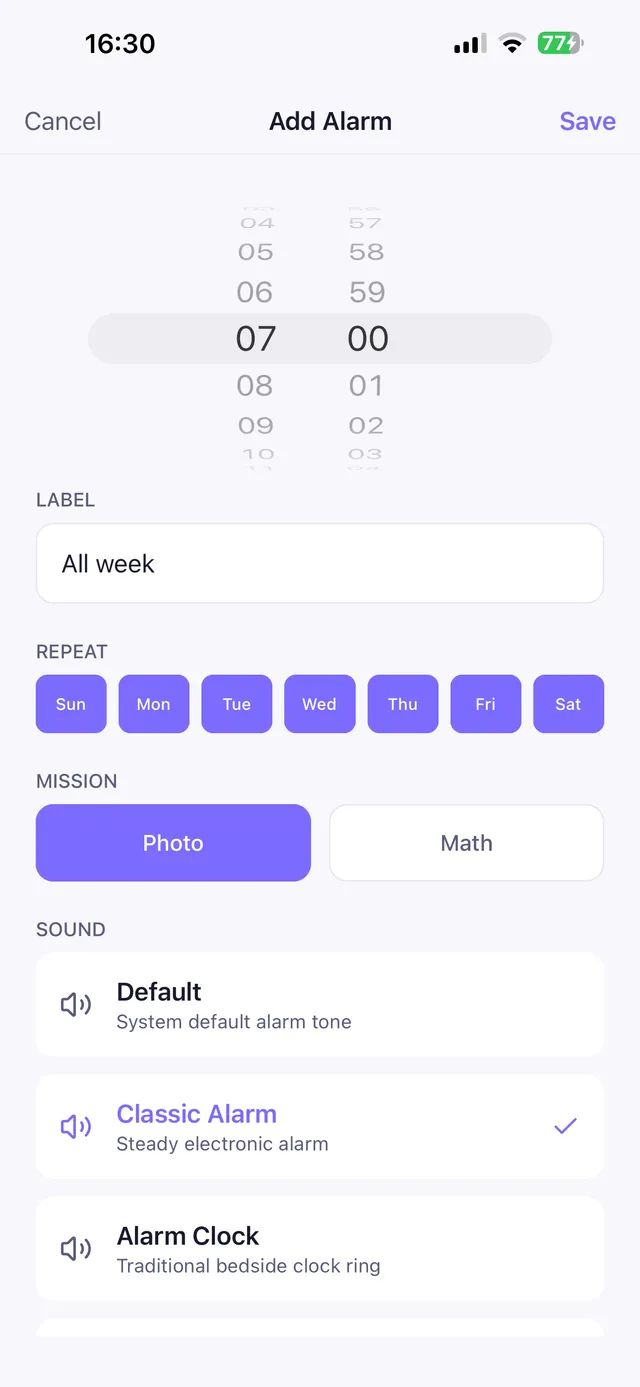
OwlRoutine offers four missions — math, word, typing and a bed photo — with easy, medium and hard levels. What makes it different is that the difficulty isn't fixed: a completed wind-down the night before earns an easier mission, while skipping it makes the morning's mission harder. It's a small nudge to fix the night, not just the morning.
Frequently asked questions
Do math alarm apps work?
For most snoozers and heavy sleepers, yes. Solving a problem requires working memory and focus, so you can't dismiss the alarm on autopilot, and you're awake by the time it stops.
How hard should a math alarm be?
Hard enough that you can't do it half-asleep, but not so hard that it takes minutes. Problems that take 20–60 seconds, like two-digit addition or simple multiplication, work well for most people.
What if I solve the math and go back to sleep?
Turn snooze off, put the phone across the room, or use a photo mission that requires you to go to a specific place, and get light and water immediately afterwards.
Are there alternatives to math alarms?
Yes: typing, word, photo, shake and step missions. Photo missions are especially good if you tend to fall back asleep in bed.
Wake up for real. Wind down for good.
OwlRoutine is a sleep-cycle alarm that makes mornings actually stick — with a guided wind-down, dismiss missions, sleep scores and rewards. Available on iPhone and Android.